

- Joined
- Dec 23, 2022
- Messages
- 682
- Reaction score
- 0
This tutorial will explain using the "getstakingstatus" Command in Maria Core Wallet Console.
The "getstakingstatus" command in the Maria Core wallet console provides valuable information about the staking functionality of your wallet.
What Does the Command Do?
"getstakingstatus" offers a snapshot of your wallet's staking status, including:
Using the Command:
1. Launch the Maria Core wallet.
2. Open the debug console.
3. Type the following command and press Enter:
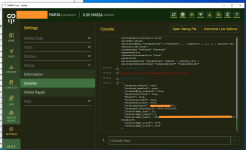
Example Output (screenshot attached):
-----
Understanding the Output:
The output will display information in a key-value format. Here's a breakdown of what the basic (not full list) key lines indicate:
"staking_status": Indicates whether staking is currently active (true) or inactive (false). Where:
"hasconnections": A boolean indicating whether the wallet is connected to the network. Options: "true" or "false"
"stakeablecoins": Indicates if there are coins that can be staked.
"stakeablebalance": Shows the balance of the coins that can be staked.
"coldstaking_enabled": indicates whether cold staking is enabled in your Maria Core wallet. Cold staking allows users to stake their Maria coins securely while keeping them in a cold (offline) wallet, providing enhanced security.
"haveconnections": Indicates if the wallet has network connections (true or false).
"mnsync": Shows whether the masternode synchronization is complete (true or false).
"walletunlocked": Indicates if the wallet is unlocked (true or false).
"stakeablecoins": Indicates if there are coins in the wallet that can be staked (true or false).
"stakingbalance": Shows the total balance of coins available for staking.
"stakingsplitthreshold": The balance threshold at which staked outputs are split to optimize staking efficiency.
"lastattempt_age": The age in seconds since the last staking attempt.
"lastattempt_depth": The depth (number of confirmations) of the block containing the last staking attempt.
"lastattempt_hash": The hash of the block where the last staking attempt was made.
"lastattempt_coins": Indicates the number of coins that were utilized in the most recent staking attempt. This value shows how many of your eligible coins participated in trying to create a staking block during the last attempt.
"lastattempt_tries": Represents the number of individual attempts made during the last staking effort. Each try is an attempt by the wallet to find a valid proof-of-stake solution using the specified coins.
Troubleshooting Inactivity:
If the output indicates inactive staking, check the following:
For further troubleshooting or in-depth information about staking in Maria coin, refer to the Maria coin documentation or open a support thread here, at Maria.Zone forum.
Enjoy! Helmuts
The "getstakingstatus" command in the Maria Core wallet console provides valuable information about the staking functionality of your wallet.
What Does the Command Do?
"getstakingstatus" offers a snapshot of your wallet's staking status, including:
- Whether staking is currently enabled or disabled.
- If enabled, the wallet's current staking mode (e.g., "Staking Active" or "Staking Not Active").
- The number of active staking coins in your wallet.
- Potential reasons why staking might be inactive (if applicable).
Using the Command:
1. Launch the Maria Core wallet.
2. Open the debug console.
- Windows/Linux: Go to Help > Debug window (or press Ctrl+D).
- Mac: Go to Debug > Console window.
3. Type the following command and press Enter:
Code:
getstakingstatusExample Output (screenshot attached):
Code:
{
  "staking_status": true,
  "staking_enabled": true,
  "coldstaking_enabled": true,
  "haveconnections": true,
  "mnsync": true,
  "walletunlocked": true,
  "stakeablecoins": 5075,
  "stakingbalance": 58850.26448670,
  "stakesplitthreshold": 5000.00000000,
  "lastattempt_age": 13,
  "lastattempt_depth": 0,
  "lastattempt_hash": "38e62fa16b807fcioregdsg4941g5dsgd461gds3cde91a9b254269435f046b0c5",
  "lastattempt_coins": 5075,
  "lastattempt_tries": 5075
}
-----
Understanding the Output:
The output will display information in a key-value format. Here's a breakdown of what the basic (not full list) key lines indicate:
"staking_status": Indicates whether staking is currently active (true) or inactive (false). Where:
- true (Staking Active): Your wallet is actively participating in staking.
- false (Staking Not Active): Staking is disabled or encountering issues. Reasons might be specified in other outputs.
"hasconnections": A boolean indicating whether the wallet is connected to the network. Options: "true" or "false"
"stakeablecoins": Indicates if there are coins that can be staked.
"stakeablebalance": Shows the balance of the coins that can be staked.
"coldstaking_enabled": indicates whether cold staking is enabled in your Maria Core wallet. Cold staking allows users to stake their Maria coins securely while keeping them in a cold (offline) wallet, providing enhanced security.
"haveconnections": Indicates if the wallet has network connections (true or false).
"mnsync": Shows whether the masternode synchronization is complete (true or false).
"walletunlocked": Indicates if the wallet is unlocked (true or false).
"stakeablecoins": Indicates if there are coins in the wallet that can be staked (true or false).
"stakingbalance": Shows the total balance of coins available for staking.
"stakingsplitthreshold": The balance threshold at which staked outputs are split to optimize staking efficiency.
"lastattempt_age": The age in seconds since the last staking attempt.
"lastattempt_depth": The depth (number of confirmations) of the block containing the last staking attempt.
"lastattempt_hash": The hash of the block where the last staking attempt was made.
"lastattempt_coins": Indicates the number of coins that were utilized in the most recent staking attempt. This value shows how many of your eligible coins participated in trying to create a staking block during the last attempt.
"lastattempt_tries": Represents the number of individual attempts made during the last staking effort. Each try is an attempt by the wallet to find a valid proof-of-stake solution using the specified coins.
Troubleshooting Inactivity:
If the output indicates inactive staking, check the following:
- Ensure the "wallet" value is true. If it's false, staking is disabled in your wallet settings.
- Look for error messages under the "errors" key. These might provide specific reasons for the inactivity.
- Verify your wallet is synchronized with the blockchain ("blockchain": true).
- Ensure you have enough mature (sufficiently aged) coins in your wallet to meet staking requirements.
For further troubleshooting or in-depth information about staking in Maria coin, refer to the Maria coin documentation or open a support thread here, at Maria.Zone forum.
Enjoy! Helmuts
 for the sake of an experiment.